
Download WinMerge – text comparison, file comparison, diff tool, open source, productivity tool, compare documents, merge files, code comparison, programming tool
Overview
WinMerge is a powerful utility designed for users who regularly work with similar texts, particularly those requiring precise identification of differences. It serves as a reliable tool for comparing files and folders, making it especially valuable in environments where accuracy and consistency are paramount. The app is particularly well-suited for developers, technical writers, and anyone managing multiple versions of documents or codebases. By presenting differences in a side-by-side format with clear visual cues, WinMerge simplifies the process of reviewing changes and merging content efficiently. Its ability to highlight discrepancies using color coding enables users to spot modifications quickly, reducing the risk of oversight during critical editing phases.
As an open-source application, WinMerge is freely available to all users, fostering accessibility and community-driven development. This model ensures continuous improvements and long-term sustainability without licensing costs. The app is designed to support a variety of workflows, from code reviews and version control tasks to document editing and content synchronization. Although the developer did not provide additional technical details about its development background, its widespread use in technical communities underscores its reliability and effectiveness. Real-world use cases include debugging code, verifying configuration files, and tracking revisions in collaborative projects.
Within the productivity tool ecosystem, WinMerge fills a niche for users who require a lightweight yet robust solution for text and file comparison. It stands out by offering a focused, no-frills approach that prioritizes clarity and functionality over unnecessary features. For professionals managing complex workflows, WinMerge provides a dependable method to maintain data integrity and streamline document management processes.
Key Features & Functionality
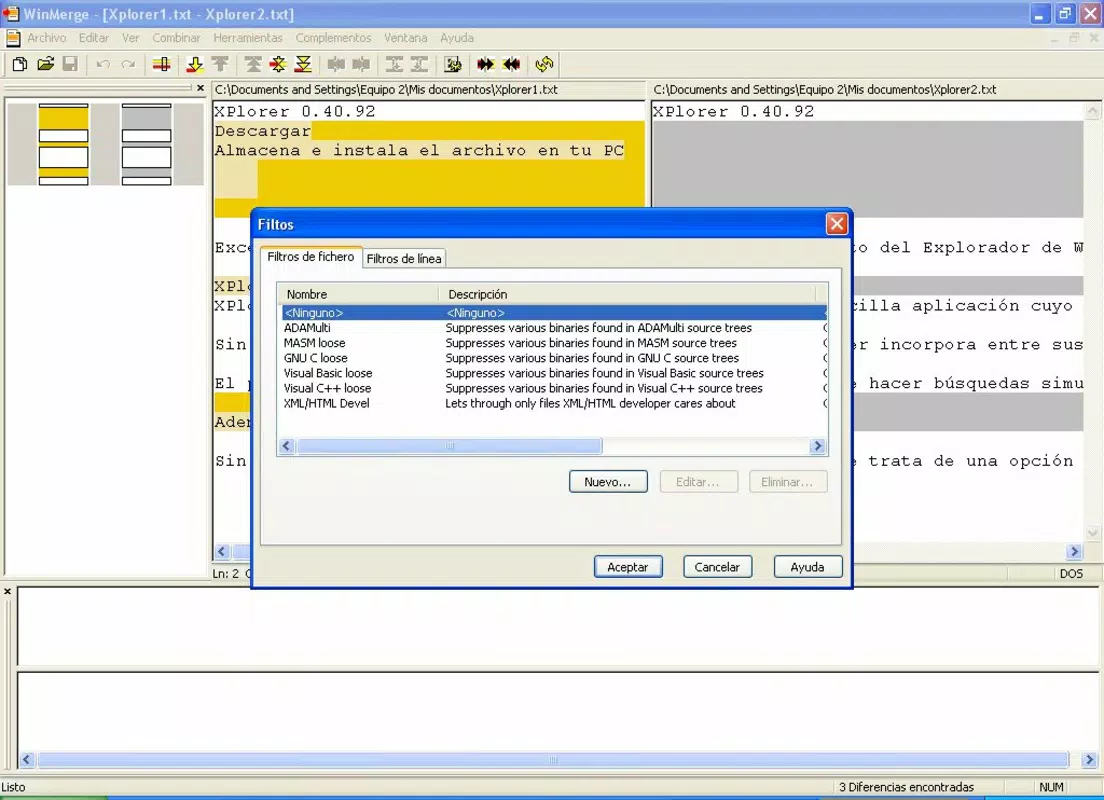
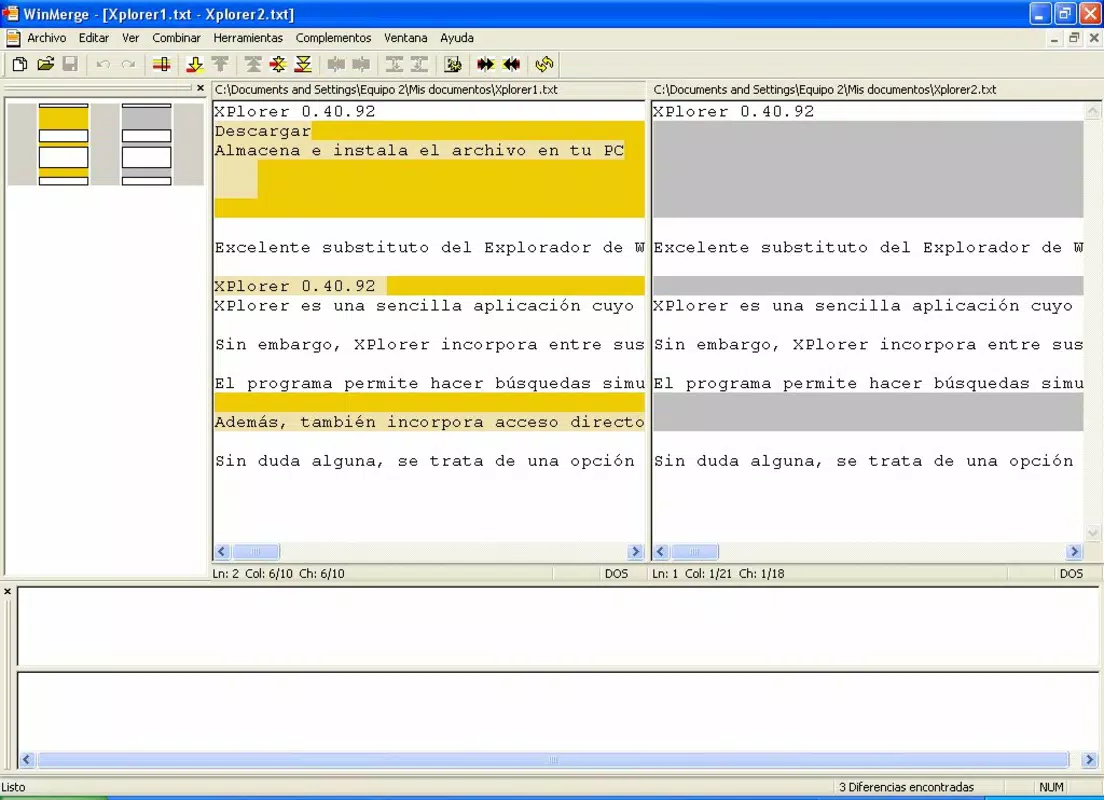
- Visual Comparison: WinMerge displays differences between two files or folders in a side-by-side layout, using color-coded highlighting to distinguish added, deleted, and modified content. This visual approach allows users to instantly identify changes without manually scanning through entire documents.
- Drag-and-Drop Functionality: Users can seamlessly transfer selected text or file content from one pane to another using drag-and-drop, enabling rapid merging of changes without requiring complex commands or manual copy-paste operations.
- Advanced User Features: The app includes customizable filters and automation tools that allow experienced users to fine-tune comparison settings, such as ignoring whitespace or case sensitivity, and to apply rules to repetitive tasks.
- Multi-Document Support: WinMerge supports the simultaneous comparison of multiple files or directories, making it ideal for comprehensive reviews and ensuring consistency across large sets of documents or code files.
- Open Source & Free: As an open-source tool, WinMerge is completely free to use, modify, and distribute. This model encourages transparency, community contributions, and long-term maintenance without recurring costs.
For example, a software developer can use WinMerge to compare two versions of a source code file, identify syntax changes, and merge updates with confidence. A technical writer managing multiple drafts can use the tool to track revisions and ensure all edits are properly integrated. The app’s structured approach to comparison reduces cognitive load and enhances workflow accuracy across diverse professional environments.
Interface, UX & Performance
WinMerge features a clean, functional interface optimized for text comparison tasks. The layout is divided into two panes, each displaying one of the files being compared, with a synchronized scroll mechanism that ensures both sides remain aligned. Navigation is straightforward, with clearly labeled buttons and menus that allow users to initiate comparisons, apply filters, and perform merge operations with minimal effort. The visual design prioritizes usability over aesthetics, focusing on clarity and efficiency.
Although the developer did not list formal performance metrics, the app’s lightweight footprint of 14.8 MB suggests it is designed for efficient operation on a wide range of Windows systems. Users can expect responsive behavior when working with moderately sized files, and the interface remains stable during repeated comparison tasks. The app maintains consistent performance across different device categories, including older machines and low-memory environments, though specific requirements were not disclosed.
Stability is a notable strength, with users reporting minimal crashes or freezes during typical use. The drag-and-drop functionality and real-time highlighting respond quickly, contributing to a smooth user experience. While no formal accessibility features were mentioned, the keyboard shortcuts and logical layout support efficient interaction for both new and experienced users.
Platform Compatibility & Technical Requirements
WinMerge is available exclusively for the Windows platform, making it suitable for users working within the Microsoft ecosystem. It supports the latest versions of Windows, although specific OS requirements were not listed by the developer. The app has a file size of 14.8 MB, indicating a lightweight installation that does not strain system resources. The current version is 2.16.11, which reflects a mature and stable release.
Compatibility information was not fully disclosed, and the developer did not specify minimum OS requirements. As such, users should verify system compatibility before installation. The app is designed for desktop use and is not available on mobile platforms such as Android or iOS. For users seeking a similar tool on mobile devices, alternative solutions would need to be explored.
Pros and Cons
Pros
- Free and open-source, ensuring no licensing costs and community-driven development.
- Lightweight with a small file size of 14.8 MB, ideal for older or low-resource systems.
- Clear visual comparison with color-coded differences for instant identification of changes.
- Supports drag-and-drop merging, enhancing workflow efficiency.
- Multi-document comparison capability for comprehensive reviews.
Cons
- Available only on Windows, limiting accessibility for users on other platforms.
- Specific system requirements were not provided, which may cause uncertainty during installation.
- Interface is functional but not visually modern, lacking contemporary design elements.
- No mobile version available for on-the-go comparison tasks.
- Advanced features may have a learning curve for new users.
FAQ
Is WinMerge safe to download and use?
Yes, WinMerge is a free and open-source tool developed by a trusted community. It does not contain malware or ads, and its source code is publicly available for inspection.
Can I use WinMerge on Android or iOS?
No, WinMerge is currently only available for Windows and is not compatible with mobile operating systems like Android or iOS.
How often is WinMerge updated?
The app receives regular updates from its development team. The latest version, 2.16.11, was released on July 28, 2025, indicating ongoing maintenance and improvements.
Is WinMerge suitable for comparing code files?
Yes, WinMerge is widely used by developers for comparing source code files. It effectively highlights syntax differences and supports features like syntax highlighting and line-by-line comparison.
Can I customize how differences are displayed?
Yes, WinMerge offers customizable filters and settings, allowing users to control how whitespace, case, and line endings are treated during comparisons.
Final Thoughts
WinMerge remains a top-tier choice for anyone needing a reliable, no-cost solution for text and file comparison. Its clean interface, robust feature set, and strong performance make it a valuable asset for developers, technical writers, and data managers. While it is limited to the Windows platform and lacks a modern visual design, its core functionality is unmatched in its category. The app’s open-source nature ensures transparency, continuous improvement, and long-term usability.
For users who frequently work with code, documents, or configuration files, WinMerge delivers exceptional value by simplifying complex comparison tasks and reducing the risk of human error. Whether you're reviewing a pull request, merging changes, or verifying content consistency, this tool streamlines the process with precision and efficiency.
Download WinMerge now


